vCards for Welcome or Verification Calling
A vCard creates a contact in a donor's phone. When saved, it stores the charity's logo, contact details, email, website, and phone numbers. Including the CLI/calling number used for welcome calling means the donor's phone will recognise the number, trust it, and display the charity's branding when you call.
Why Use a vCard for Welcome Calling?
Donors — and their phones — increasingly ignore or block unfamiliar numbers. Third-party services like Hiya and Truecaller may flag unrecognised calling numbers as spam. Storing your calling number as a contact in the donor's phone gives it the highest level of trust, which means:
- welcome call contact rates improve, leading to higher quality in the field;
- new donors have greater trust and satisfaction, leading to higher retention; and
- fewer calls are needed, reducing time and call costs.
You can choose what contact details are in the vCard; and that means you can include the calling number/CLI that you use for welcome calling via Evergiving.
When the donor receives your welcome call via Evergiving, their phone will recognise the calling number/CLI, trust it and display the branding and details of the charity instead.
Example vCard
Scan this QR Code on your mobile phone, it will download a vCard that you can save to your contacts in your phone.
What Happens When I Call a Donor?
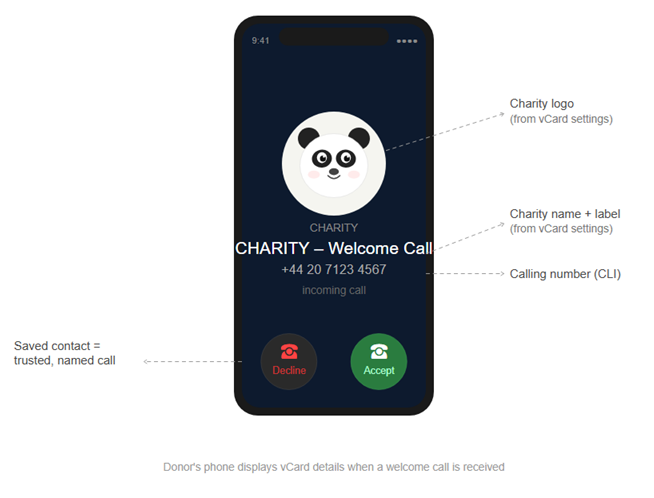
When a donor scans and saves the vCard, the details you configured in vCard Settings are stored directly on their phone as a contact. From that moment, your calling number is no longer an unknown number — it is a named, branded contact.
When you place a welcome call, the donor's phone looks up the calling number against their saved contacts and displays the contact details from the vCard: the charity name, logo (or brand ambassador image), and any label you assigned to the number, such as "Welcome call". The donor sees who is calling before they answer, which is the core of why the vCard improves contact rates.
No further action is needed on your side once the vCard is saved. The display is handled entirely by the donor's phone using the contact data already stored on it.
What Happens when a Donor Calls Back?
This depends on whether it is during the welcome calling period or after:
During the Welcome Calling Period, And:
A Call Center Agent is Available or between Calls:
Evergiving will first route inbound calls to the agent or agents assigned to the activity, via the conditions on their call center team. See inbound-fundraiser-numbers for more detailed information. Put simply, they will know who is calling and can answer the call:
"Hi Maria, thanks for calling me back. I was just calling you to check your details and welcome you on board!"
Make sure that:
- the calling number/CLI is linked to the campaign and only the campaign at Accounts > CLI Management; and
- the call center team the agents are assigned to is set to Allow Inbound Calls - Yes.
A Call Center Agent is not Available:
Where a call center agent is not logged in, or neither a call center agent nor admin operations user answers the call, Evergiving will play the prerecorded voicemail greeting for the Campaign.
After the Welcome Calling Period
Evergiving routes the inbound call to a number of your choosing. This requires configuration in two places.
Power Dialler Inbound Settings
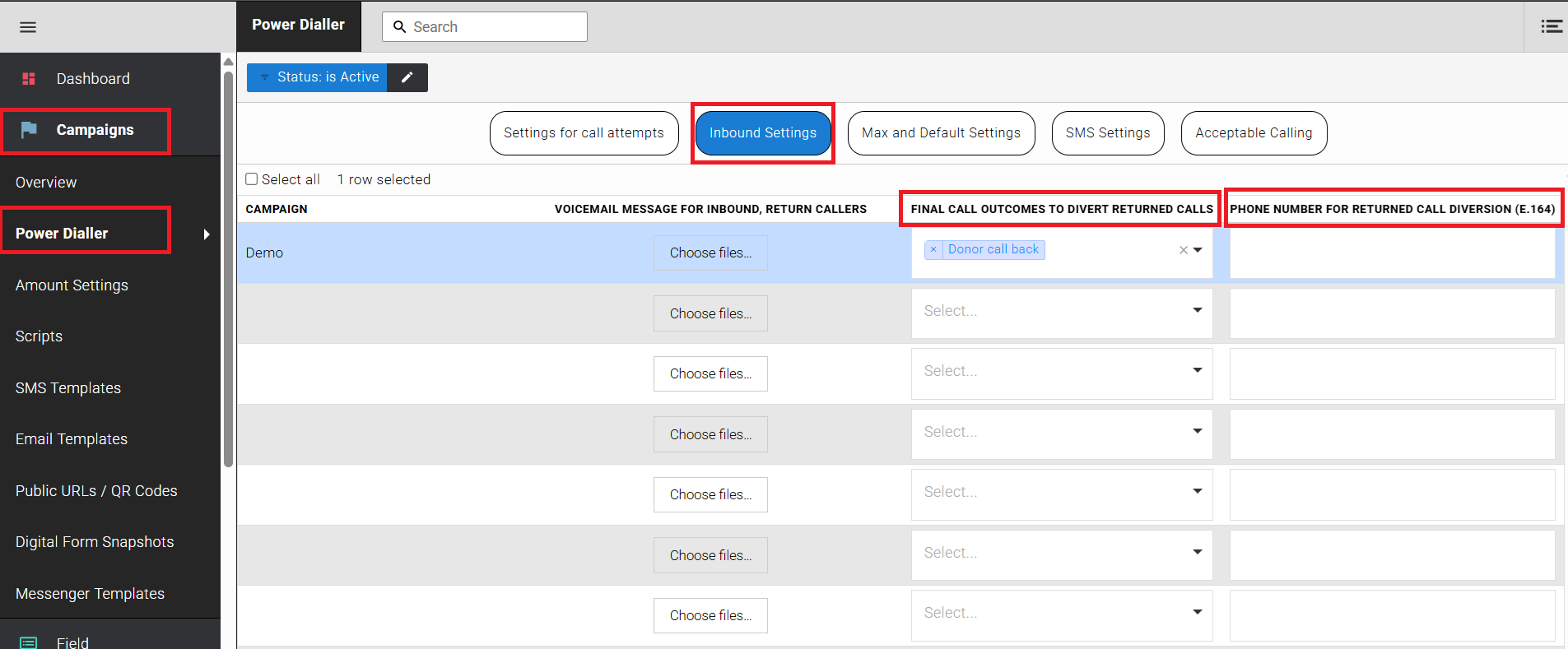
Go to Campaigns > Power Dialler, then select the Inbound Settings tab. For the relevant campaign:
- Upload a Voicemail Message for Inbound, Return Callers. This is the greeting donors hear if no agent is available to answer their call.
- Under Final Call Outcomes to Divert Returned Calls, select the final call outcome or outcomes that should trigger inbound call diversion.
- Enter the Phone Number for Returned Call Diversion (E.164) — this is the number inbound callers will be diverted to after the welcome calling period ends.
Warning
Only WAV files are accepted for the voicemail message.
Campaign General Settings
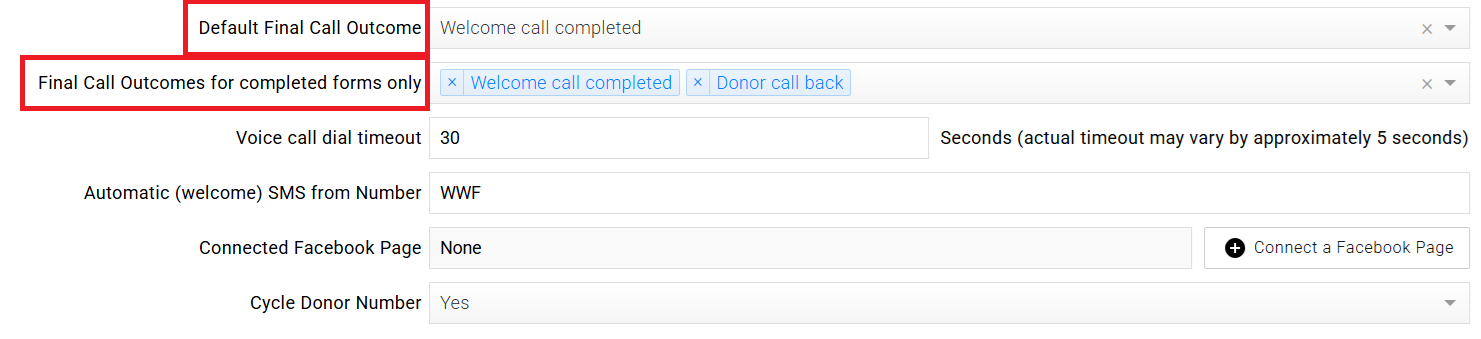
Go to Campaigns > Overview, open the campaign, and select General Settings. Use the Final Call Outcomes for completed forms only field to set the default final call outcome for outbound calls. This determines which outcomes are available for selection in the Power Dialler Inbound Settings above.
How Do I Get a vCard for Welcome Calling?
To set up a vCard for your campaign, see Configure a vCard.