Creating and Managing SMS Templates
This section covers how to create, manage, edit and use SMS templates within Evergiving for consistent and automated communication with donors.
Creating SMS Templates
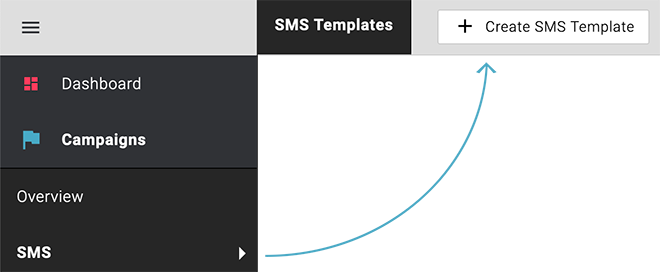
To create a new SMS template, go to Campaigns > SMS Templates, and click on the top right button "Create SMS Template".
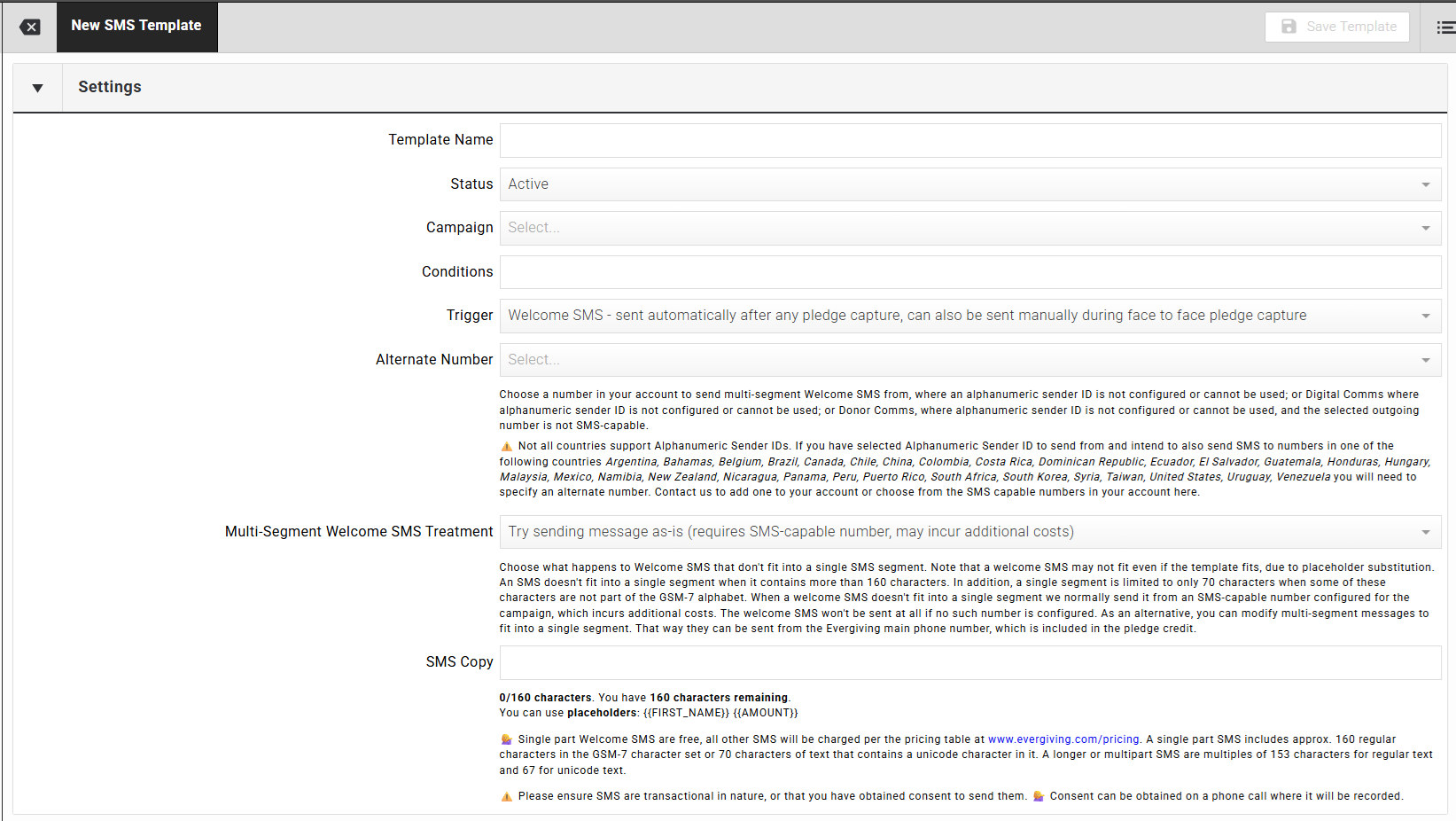
In this section, you can configure your SMS template.
- Template Name: Assign a name for easy identification.
- Status: Mark templates as Active (live) or Inactive.
- Campaign: Link the template to a campaign.
- Conditions: Contact support to set conditions for sending (e.g., donation amount, language).
- Trigger: Select which type of communication the SMS is.
- SMS Copy: Include merge fields (e.g., First Name) and customize the message content, including links and emojis.
SMS Triggers
The Trigger field on an SMS template defines when and how the message is sent. The following triggers are available:
| Trigger | Dispatch Method | Available Variables | Notes |
|---|---|---|---|
| Welcome SMS (automatic + manual) | Automatically after any pledge capture; also manually during face-to-face pledge capture | {FIRST_NAME}, {FUNDRAISER_FIRST}, {AMOUNT}, {PLEDGE_ID} |
Most flexible welcome trigger; supports both automated and fundraiser-initiated sending |
| Welcome SMS (automatic only) | Automatically after pledge capture only | {FIRST_NAME}, {FUNDRAISER_FIRST}, {AMOUNT}, {PLEDGE_ID} |
Manual sending not supported |
| Recovery SMS | Automatically after pledge capture only | {FIRST_NAME}, {FUNDRAISER_FIRST}, {AMOUNT}, {PLEDGE_ID}, {RECOVERY_LINK} |
Used to send donors a link to complete or recover a failed payment setup |
| Donor Comms | Manually via phone console only | {FIRST_NAME}, {FUNDRAISER_FIRST} |
{PLEDGE_ID}, {AMOUNT}, and {RECOVERY_LINK} not available as no sign-up event |
| Digital Comms – Fundraisers | Manually by fundraisers | {FIRST_NAME}, {FUNDRAISER_FIRST} |
Sends a digital form for the campaign the fundraiser is assigned to that day; face-to-face use |

Warning
Some countries require an alternate number before SMS can be sent. Contact Evergiving support if your organisation operates in one of the listed restricted countries.
Tip
Four merge fields are available to personalise your SMS. These are listed below.
Available merge fields
{FIRST_NAME}: Donor's first name.
Example: Hello Robert, Thank you for supporting our work!{PLEDGE_ID}: Evergiving Pledge ID — only available on SMS sent after sign-up.
Example: Your donation reference number is 5123456{FUNDRAISER_FIRST}: Fundraiser's first name.
Example: Nice talking with you today. Best Regards, John{AMOUNT}: Donation amount — only available on SMS sent after sign-up.
Example: Thanks for your generous donation of $30
SMS Length and Character Limits
SMS messages use one of two character encodings: GSM-7 or Unicode.
GSM-7 is the standard encoding for SMS and covers the basic Latin alphabet, digits, and common punctuation.
- A single-part GSM-7 message supports up to 160 characters. Most Western European languages can be written entirely in GSM-7.
Unicode (UCS-2) supports a far wider character set, including accented characters outside the GSM-7 extension table, Arabic, Chinese, emoji, and other scripts. However, Unicode messages are less efficient:
- A single-part Unicode message supports only 70 characters.
If a message exceeds the single-part limit, it is sent as a multipart SMS. Multipart messages are split into segments, each with a reduced character limit due to the overhead of a joining header: 153 characters per segment for GSM-7, and 67 per segment for Unicode.
Important: Including even a single Unicode character — such as a curly apostrophe, an accented letter not in the GSM-7 table, or an emoji — converts the entire message to Unicode encoding. This reduces the effective character limit and increases cost, as billing is per segment. Always verify your template uses only GSM-7 characters if cost efficiency is a priority.
Maximizing Characters (GSM-7)
GSM-7 includes common Latin letters, numbers, and symbols. Some accented characters are supported, but not all. Check this GSM-7 character list for details.
Tip
Some GSM-7 characters, like {, take two character spaces.
Sending SMS from Templates
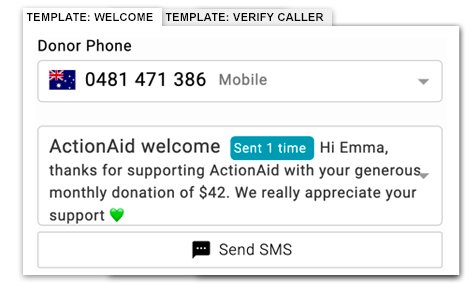
In the Evergiving phone console, agents can select from available SMS templates and send messages directly, based on the conditions set.