Timesheets
The Timesheets system is a centralized tool for tracking all hours worked by your team members. It is designed to automate routine tracking while providing the flexibility to record a wide range of activities.
Its primary purpose is to provide a single source of truth for workforce management, enabling accurate payroll processing and insightful reporting on how time is spent across your organization.
It is accessible through the agent-timesheets page in the payroll section of Evergiving. Each day, a Fundraiser or Campaign Manager assigned to a team will have their hours automatically logged in the team logs section.
Core Concepts and How They Work Together
The system is built on a few key concepts that interact to save you time and ensure accuracy.
1. Automated vs. Manual Time Tracking
- Automated Tracking: To reduce manual data entry, the system automatically logs standard "working" or "fundraising" hours for every team member each day. This is based on a changeable default value (e.g. 7 hours) set at the account level.
- Think of it as: The system assuming a standard workday unless you tell it otherwise.
- Manual Adjustments: There are two main ways to modify these automated hours:
- Via Team Assignment: You can set custom daily hours for a fundraiser when adding them to a team or by editing their entry in the team roster. This is good for setting a specific schedule that differs from the default.
- Via the Timesheets Page: For precise, day-by-day control, you can navigate to Payroll / Fundraisers Timesheets to update hours for any past or current day. This is essential for correcting absences, late arrivals, or early departures.
2. Fundraising vs. Non-Fundraising Hours
A key strength of the system is its ability to categorize time, giving you a clearer picture of productivity.
- Fundraising Hours: This is the time spent on primary fundraising activities. It is primarily populated by the automated default hours and manual adjustments mentioned above.
- Non-Fundraising Hours: This category covers all other activities, such as training, meetings, administrative tasks, or sick leave. You can create custom labels for these under Account > Timesheet Settings.
- How they interact: When you log "Training Hours," for example, you are not adding to the fundraiser's total time, but rather categorizing a portion of it. The system can use this to differentiate between time spent actively fundraising versus other duties, which is crucial for calculating performance metrics and accurate pay.
The Big Picture: Data Integrity and Usage
-
Why Accuracy Matters: The timesheet data directly feeds into two critical areas:
- Payroll: Ensuring everyone is paid correctly for all hours worked, across all activity types.
- Performance Analytics: Understanding how time allocation impacts fundraising results. For example, you can analyze the return on investment for training by comparing "Training Hours" to funds raised.
-
How Data is Accessed and Used:
- Filtering & Analysis: The Timesheets page allows you to filter data by date and fundraiser to review time allocation.
- Exports: For deeper analysis or external payroll processing, you can generate detailed exports of the timesheet data. These exports can be tailored to show either Fundraiser or Agent perspectives, providing the flexibility needed for different reporting requirements. For more details, see Export Data.
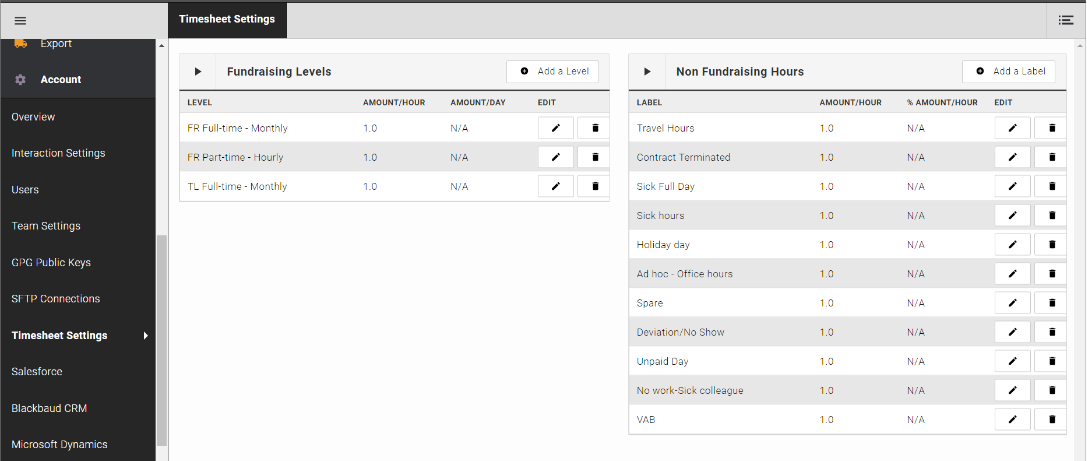
Read how to Configure Timesheets.