Australian Sender ID Requirements
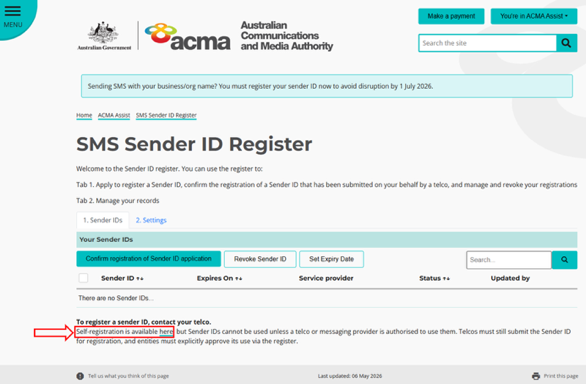
ACMA SMS Sender ID Register
The Australian Communications and Media Authority (ACMA) has introduced a mandatory SMS Sender ID Register. From 1 July 2026, your Sender ID must be registered on the ACMA Register for every supplier who sends SMS on your behalf using your Sender ID. You can find out more on the ACMA website.
From 1 July 2026:
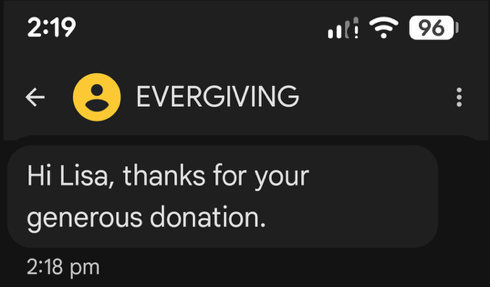
- Any unregistered Sender ID is replaced with "Unverified".
- "Unverified" messages may appear grouped together on phones.
- Message trust and deliverability may be reduced. All texts from "Unverified" senders are grouped together in the same message thread on people's phones, indicating to them it may be a scam.
- Registering your Sender ID means your supporters can trust that messages from you are genuine.
What you need to do
If you haven't submitted an application to Evergiving, you'll need to do so before we can send SMS on your behalf using your Sender ID. The application process can take up to several weeks. An application involves:
- Returning the completed Sender ID Australia – Customer Information.xlsx and attaching an ASIC extract showing your company Officeholders (i.e. Directors and other Officers) or an ACNC extract showing your Responsible People.
- If you haven't previously registered your Sender ID in the ACMA Register, we'll also need you to provide photo ID of your Authorised Representative. If you have already registered the Sender ID in the ACMA Assist Register, you have already been through the identity confirmation process, so you don't need to provide photo ID again.
- If your Authorised Representative is not listed on your business extract as an Officeholder, have someone who is listed on the business extract complete the Letter of Authorisation and return it on your letterhead. Note that the person you nominate as an Authorised Representative is expected to be an Authorised Contact on your ABN. If you nominate someone who isn't, you may need an Authorised Contact to log into ACMA Assist and create a user for them.
- Return all required documents to support@evergiving.com. ID photos can be password protected, or contact us for more information about supplying them securely.
Next steps
After you submit the information to Evergiving, our service provider (Twilio) will confirm your details and submit your application to the ACMA Assist Sender ID Register. Your Authorised Representative will receive an email from the ACMA with the subject line "SMS Sender ID Register: request to confirm your application". The Authorised Representative then needs to:
- Open the ACMA email and click the link to open the ACMA Assist website (the Australian Government portal for Sender ID approvals).
- Sign in to ACMA Assist using the myID app (the Australian Government's Digital Identity app used to verify identity when accessing government services). See How to set up myID. Set this up in advance, as it can take a little while to upload sufficient identity documents (e.g. licence, passport, Medicare). More information on this step is available from the ACMA: Accessing the Register for the first time.
- Review the Sender ID request and press Confirm registration. Registration is not complete until this approval step is completed.
Once your Sender ID is approved:
- Your organisation will have access to the ACMA Assist portal to manage, approve and revoke your Sender ID registration(s).
- Your Authorised Representative can add additional users to give them access to the ACMA Assist portal.
Note: If your Authorised Representative isn't an Authorised Contact on your ABN, someone who is an Authorised Contact will need to log into ACMA Assist and create an Authorised User for your Authorised Representative so their account is linked to your organisation. This links the user's profile with your company's ABN data and allows them to approve the Sender ID.
FAQs
Can I choose any Sender ID?
No. A valid Sender ID must:
- be between 2 and 11 characters
- not consist of only numbers
- not start or end with a space or underscore
- not include the word "Unverified"
- not be misleading or offensive
- not solely consist of a restricted word or words
- match one of the following valid use cases:
- your registered business name
- your ABN company name (your ABN must be active)
- your registered trademark
- your domain name (you must be the registrant and actively use it)
Note: Sender IDs are case insensitive, so "EVERGIVING" and "evergiving" are treated as the same Sender ID by the ACMA.
Your Sender ID must also be clearly linked to your organisation. This helps your supporters recognise who the message is from and reduces the risk of confusion or impersonation. You can register a Sender ID that:
- is the same as your organisation's name, or a shortened version (for example, "Australia Post" → "AusPost")
- is an acronym or initialism of your name (for example, "Australian Communications and Media Authority" → "ACMA")
- also includes extra words that relate to your organisation's role, location, or the purpose of the message (for example, "ACMA Alerts").
Why are you asking for photo ID?
There are different levels of telcos: Certified Telcos, Originating Telcos and Participating Telcos. Our provider, Twilio, is a Certified Telco, and their responsibilities include verifying the identity and legitimacy of the person and organisation they are registering Sender IDs for. This isn't a requirement for all telco types. You can view ACMA approved telcos and their types.
I've already registered my Sender ID through a different supplier
If you use multiple SMS providers, you must register your Sender ID with each of them. Registering your Sender ID through a telco is how you authorise them to use your Sender ID.
We're a state-based charity – can we all use the same Sender ID?
Yes. A Sender ID can be registered and used by multiple organisations if each organisation can prove it has a valid use case and the Sender ID brand connection can be clearly established for the other entity or entities.
Do I still own my Sender ID if I register it with you?
Your Sender ID always belongs to you, even if you've accepted our help to register it on ACMA Assist. That process only grants us access to use your Sender ID. Through ACMA Assist you can withdraw permission for a telco to use your Sender ID at any stage.
My Authorised Representative isn't on our ASIC extract – can I use the Relationship Authorisation Manager (RAM)?
Unfortunately not. The SMS Sender ID Register uses the Australian Business Register (ABR) to check whether someone is an authorised representative of a business or organisation. While some agencies check the RAM for authorisation arrangements, the SMS Sender ID Register only uses the ABR. See Update your details on the Australian Business Register.
Is there an alternative to using myID to log in to ACMA Assist?
Access to ACMA Assist and the SMS Sender ID Register currently requires the Australian Government's myID app (Digital ID) to verify your identity. There are no direct alternatives to this login. Representatives of organisations applying to register a Sender ID must use a myID with a Standard identity strength to log in to ACMA Assist. The use of myID is an anti-fraud measure designed to verify the identity of individuals accessing the SMS Sender ID Register.
I can't find an ASIC extract listing our Directors and Officers
Your Finance team may have a login for ASIC Edge. In the Companies / ASIC registered agents section, the Company Officeholders section has the information about your Directors and Officers. Otherwise your Directors can log in and print this information from the ASIC officeholder portal. To access it they'll need their corporate key from the top right-hand corner of their annual statements. Alternatively, an ACNC extract should be accepted in place of an ASIC extract.
Can I register my Sender ID directly with ACMA?
Yes, you can, using the self-registration link on the ACMA Assist portal. However, you'll still need to register your Sender ID with every supplier/telco you want to send SMS on your behalf.